Topic clusters and pillar pages, explained
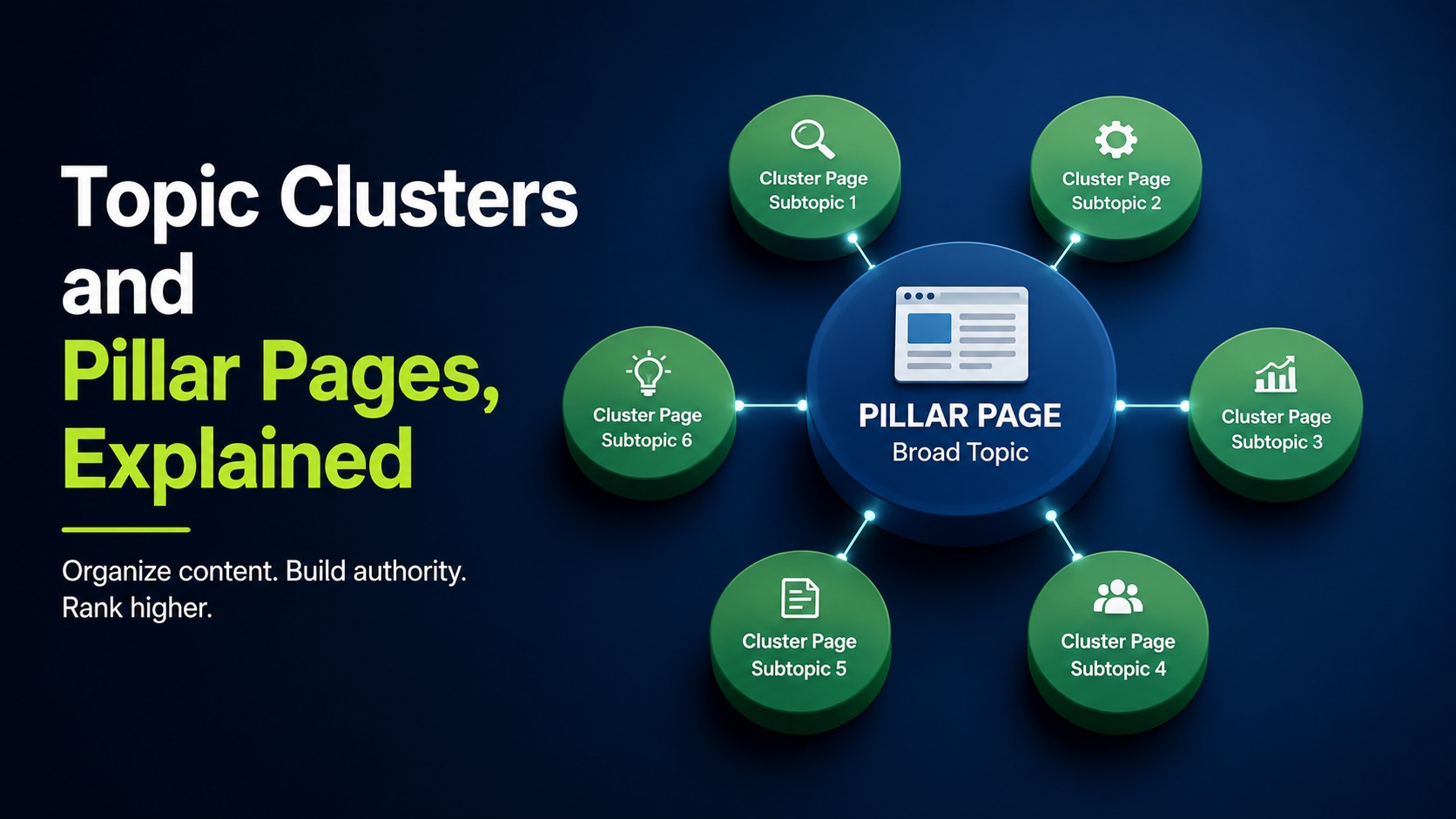
Most blogs grow like a junk drawer. You write about whatever felt urgent that week, and two years later you have 80 posts that barely talk to each other. Google looks at that mess and struggles to figure out what you actually know. Topic clusters are the fix, and they are simpler than the jargon makes them sound.
A topic cluster is a group of related pages built around one central pillar page. The pillar covers a broad subject at a high level. Cluster pages each cover a narrow subtopic in depth, and every cluster page links back to the pillar. That linking pattern tells search engines you have real coverage of the topic, not one thin post.
What a pillar page actually is
A pillar page is a long, broad page that introduces a subject and points to everything underneath it. Think of a page titled something like a complete guide to email marketing. It touches deliverability, list building, subject lines, and automation, but it does not exhaust any of them. Instead, each of those becomes its own detailed post, and the pillar links out to all of them. The pillar earns links and ranks for the head term. The cluster pages rank for the specific searches.
What cluster pages do
Cluster pages answer one specific question really well. If your pillar is about keyword research, a cluster page might cover finding low-competition keywords, or how to do keyword research for free. Each one goes deep on a single angle. Because they all link up to the pillar and sometimes sideways to each other, a reader who lands on one can move through the whole topic without hitting a dead end. That is good for people and good for crawlers.
Why this structure helps rankings
Topic clusters help rankings because they concentrate relevance and internal link equity around one subject. When ten pages on the same theme point to a central hub, Google reads that as topical authority. You are no longer the site with one post about a topic. You are the site with a section about it. This also reduces the odds that two of your own pages compete for the same query, which is a quiet problem on older blogs. A quick content audit usually surfaces those overlaps fast.
How to build your first cluster
Start by picking a broad topic you want to own, then map the questions people ask around it. Pull those questions from Google autocomplete, People Also Ask boxes, and your own sales conversations. Group them. The broad theme becomes the pillar. Each cluster of questions becomes a supporting post. Write the pillar first so you know what it needs to link to, then publish cluster pages over time and connect each one back with a clear anchor. Our free SEO tools can help you spot which subtopics have real search demand before you commit to writing them.
Here is the order I use. Choose the pillar topic. List 8 to 15 subtopics. Confirm each has search demand and matches on-page fundamentals from our on-page SEO guide. Draft the pillar. Publish clusters and link them both ways. Do not try to launch all fifteen in a weekend. Two or three solid cluster pages beat fifteen thin ones.
Mistakes that waste the effort
The most common mistake is treating the pillar as a link dump with no substance. If your pillar is 400 words of throat-clearing, it will not rank and it will not help the cluster. Give it real depth, the kind a reader would bookmark. The second mistake is forgetting the links. A cluster only works when the pages actually connect, so every new post needs an inbound link from the pillar and an outbound link back. The third is chasing subtopics with no audience. Before you write a cluster page, confirm someone searches for it. Writing about how to write a blog post that ranks makes sense if that traffic exists for you; a hyper-niche angle nobody queries does not.
How long before it pays off
A cluster rarely moves rankings in week one. You are building a structure that compounds. As you add pages and links, the pillar gains authority and the cluster pages start pulling long-tail traffic you never targeted directly. Give it a quarter of consistent publishing before you judge it. If you want a running start on your own site, our free SEO audit will show which existing posts already form a loose cluster you can tighten up.
Topic clusters are not a trick. They are just an honest way of organizing what you know so that both readers and search engines can follow it. Pick one topic this month, map the questions, write the pillar, and connect three posts to it. That single structured section will outperform a year of scattered publishing.
Frequently asked questions
How many cluster pages does one pillar need?
There is no fixed number, but aim for at least five to eight cluster pages before a pillar feels complete. Fewer than that and the structure looks thin. Add more over time as you find new subtopics with real search demand. Quality of each page matters more than hitting a specific count.
Should a pillar page rank on its own?
Yes. A good pillar targets the broad head term and should rank for it as the cluster grows. It earns backlinks because it is a useful overview, and it passes authority to cluster pages through internal links. If your pillar cannot rank for anything, it is probably too thin or too vague.
Do cluster pages need to link to each other?
Linking every cluster page to the pillar is the priority. Sideways links between related cluster pages help too, but only when the connection is genuinely useful to a reader. Do not force links just to hit a quota. Natural, relevant connections are what search engines reward and what keeps people moving through your content.
Can I turn an existing blog into topic clusters?
Absolutely, and it is often faster than starting fresh. Group your existing posts by theme, pick the strongest broad post in each group as a pillar, and add internal links to connect the rest. A content audit makes this grouping obvious and usually reveals a few clusters you already have without realizing it.
How is a pillar page different from a category page?
A category page is a list of links, usually auto-generated, with little original writing. A pillar page is a real piece of content that explains a subject and links out to deeper posts within the body text. Category pages help navigation; pillar pages help rankings and answer reader questions directly.
Want this done for your site?
Run a free audit and see exactly what to fix for Google and AI search.